Confluence REST API를 활용하여 페이지 작성/수정/삭제 하기
실무에서 Confluence 문서 자동화가 필요하여 REST API에 대하여 간단하게 정리하였다.
자신이 환경이 Cloud 환경이냐, 자체 서버냐에 따라 조금 다르므로 아래 링크들은 참고한다.
API 문서
* Cloud
https://developer.atlassian.com/cloud/confluence/rest/v1/
The Confluence Cloud REST API
developer.atlassian.com
* 자체 서버
https://docs.atlassian.com/ConfluenceServer/rest/8.5.0-m04/#api/admin/group-create
https://docs.atlassian.com/ConfluenceServer/rest/8.5.0-m04/#api/admin/group-create
Deletes a labels to the specified content. When calling this method through REST the label parameter doesn't accept "/" characters in label names, because of security constraints. For this case please use the query parameter version of this method (/conten
docs.atlassian.com
2024.12.05 현재 기준, Cloud 환경은 Rest v2를 지원하지만, 자체 서버는 v1밖에 지원하지 않는다.
뭐 기본 기능을 사용하는데 있어 큰 차이는 없을 듯?
인증
REST API 요청을 하기 전 단계로 헤더에 인증 정보를 담아야 한다.
인증 방법은 크게 2가지가 있다.
1. ID / PASSWORD 를 사용하는 방법
2. 인증 토큰을 사용하는 방법
1번 방법은 보안적으로 취약하기 때문에 2번 방법을 사용하는 것을 권장한다.
인증 토큰을 발급 받는 방법은 자체 서버를 기준으로 아래와 같이 발급받으면 된다.
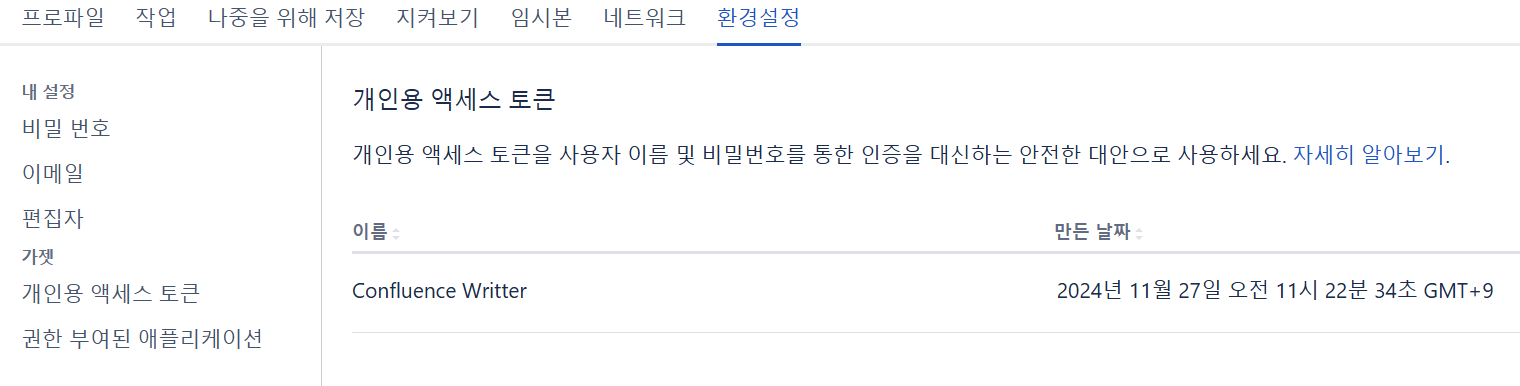
[환경 설정] -> [개인용 액세스 토큰] -> [토큰 만들기]
만들어진 토큰은 다시 발급받지 못하므로 중요한 장소에 저장해둔다.
파이썬 예제
ID / PASSWORD 를 사용하는 방법
import requests
import base64

# 인증 정보
email = "your-email@example.com"
password = "your-password"

# Basic 인증 헤더 생성
auth_string = f"{email}:{password}"
auth_encoded = base64.b64encode(auth_string.encode()).decode()  # Base64로 인코딩

# 요청 헤더에 Authorization 추가
headers = {
    "Authorization": f"Basic {auth_encoded}",
    "Accept": "application/json",
}

# Confluence API 엔드포인트
url = "https://your-confluence-site.atlassian.net/wiki/rest/api/content"

# GET 요청
response = requests.get(url, headers=headers)

# 응답 처리
if response.status_code == 200:
    print("Response Data:", response.json())
else:
    print("Error:", response.status_code, response.text)
인증 토큰을 사용하는 방법
import requests

# Confluence API 정보
BASE_URL = "https://your-confluence-site.atlassian.net/wiki/rest/api/content"
API_TOKEN = "your-api-token"

# 페이지 정보
PAGE_ID = "123456"  # 페이지 ID

# GET 요청으로 페이지 데이터 가져오기
response = requests.get(
    f"{BASE_URL}/{PAGE_ID}",
    headers={
        "Authorization": f"Bearer {API_TOKEN}",  # Bearer 인증
        "Accept": "application/json"  # JSON 응답을 요청
    }
)

# 응답 처리
if response.status_code == 200:
    print("Page data:", response.json())
else:
print("Failed to fetch page data:", response.status_code, response.text)'ETC > Others' 카테고리의 다른 글
| [Flutter] Cannot fit requested classes in a single dex file 에러 해결법 (0) | 2024.05.22 |
|---|---|
| [Flutter] Flutter 설치 및 기본 프로젝트 세팅 (0) | 2024.01.28 |
| [RabbitMQ] 서버 간 통신 메세지 큐, 설치 및 실행 - 1 (1) | 2022.05.03 |